

One Cool Feature, Lots of Trade-offs Is It Worth $1,300?
The big picture: Not a massive upgrade, but not boring either
If you were hoping Samsung would completely reimagine the Ultra lineup this year, the S26 Ultra might leave you a little underwhelmed. A lot of what made last year’s S25 Ultra great is still here and that’s mostly a good thing. But what’s new is genuinely interesting, even if it comes wrapped in some real trade-offs worth knowing about before you spend your money.
After about a week of daily use, here’s what actually matters.
──────────────────────────────────────────────
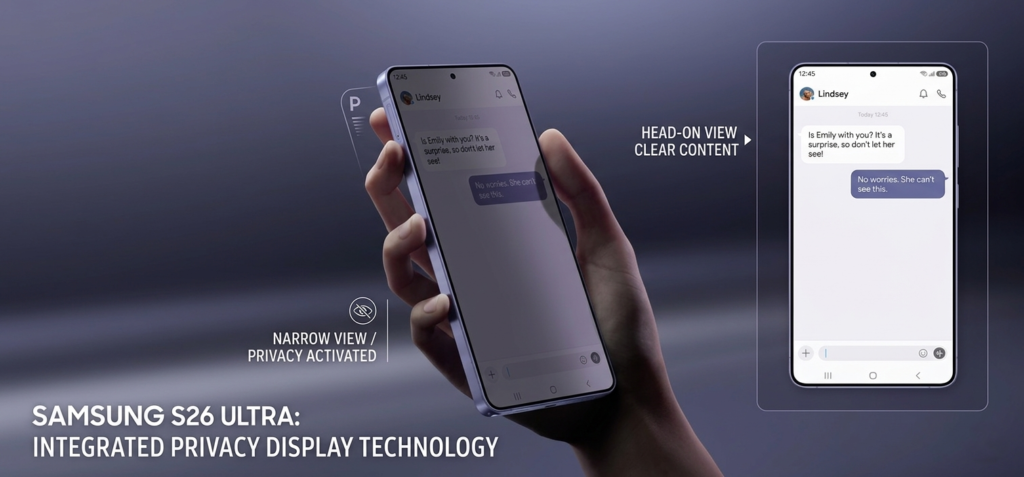
The Privacy Display: Samsung’s boldest hardware move in years
What it does
The S26 Ultra ships with a 6.9-inch OLED panel at 1440p resolution with the same 1-120Hz refresh rate as before. But there’s one brand-new trick built into the hardware this time: a Privacy Display mode that lets you lock down your screen so nobody around you can snoop.
Toggle it on, and the viewing angles tighten up dramatically not just from the sides, but from above and below too. You can enable it globally, or set it to trigger only in specific apps like your banking app or messaging. You can even set it to only hide incoming notifications. That level of control is genuinely impressive.
Unlike a $20 privacy screen protector, this is baked into the display hardware meaning it works on a pixel level, not just a physical filter stuck on top.
The trade-off you need to know
Here’s how it actually works: the display has two sets of pixels wide-angle ones visible from any direction, and narrow-angle ones only visible head-on. When Privacy Display is on, Samsung simply shuts off the wide-angle pixels. The result? Your effective resolution is literally cut in half. Text edges get blockier, fine details soften, and peak brightness can dip slightly (though the phone tries to compensate by boosting the remaining pixels).
What’s more subtle and this affects everyday use even when Privacy Display is off is that the narrow-angle pixels are always there. That means your standard viewing angles are fractionally worse than a phone without this feature, all the time. It’s not dramatic, but pixel peepers will notice.
There’s also the matter of it still being an 8-bit display simulating 10-bit color, while competitors have moved to native 10-bit. And the anti-reflective coating isn’t quite as strong as last year’s S25 Ultra. None of this makes it a bad display it’s still excellent but for $1,300, there are sharper panels out there.
──────────────────────────────────────────────
Design: Thinner, rounder, and slightly more annoying to use
Samsung shaved a bit off the thickness, rounded the corners more, and gave the S26 Ultra a look closer to the rest of its 2025 lineup. It looks sleek and modern no complaints there. But those rounder corners mean the S Pen slot is now curved, so you have to insert it in a specific orientation rather than just tossing it in either way. Small thing, but mildly annoying if you’re used to the old design.
The camera bump has grown into more of a plateau, and combined with the thinner body, the phone rocks noticeably when you lay it flat on a desk and try to type. Again, a case fixes this, but it’s worth knowing. The switch back to aluminum sides from titanium makes no real practical difference, though it does invite some inevitable comparisons to certain Cupertino devices.
──────────────────────────────────────────────
Performance and battery: Solid, but Samsung played it safe
The Snapdragon 8 Elite Gen 5 for Galaxy is the engine here, and it’s powerful. Benchmarks land in line with other Snapdragon 8 Elite devices, with the standard 20-30% year-over-year CPU improvement. Gaming is smooth, multitasking is effortless, and animations stay fluid. At this point flagship performance is almost a given it’s great, moving on.
Battery life is slightly better than the S25 Ultra despite having the same 5,000mAh cell, thanks to improved efficiency from the chip and software. Charging tops out at 60W this year, which is a minor bump. Standby time still isn’t class-leading, but daily use is genuinely comfortable.
What isn’t here: Qi2 magnets, a silicon-carbon battery for faster charging cycles, and any meaningful push toward faster wireless charging. These feel like deliberate decisions rather than oversights, and they’re frustrating ones. A version of this phone with a bigger battery and magnets would have been near-universally praised. Instead, Samsung played it safe.
──────────────────────────────────────────────
Cameras: Better lenses, smarter software
The camera story on the S26 Ultra is mostly about refinement. Both the main camera and the 5X telephoto have wider apertures this year, meaning more light, slightly better low-light results, and a touch more natural background blur on close subjects. For most people, photos from this phone will look noticeably better than last year without them knowing exactly why.
On the software side, Samsung added APV log codec support for videographers who want more color grading flexibility, and Horizon Lock a stabilization feature that crops into the 200MP sensor to deliver incredibly smooth Quad HD video at up to 60fps. It’s one of the better implementations of this type of stabilization we’ve seen.
One step back worth noting: the main camera’s minimum focus distance got worse, making extreme close-up shots less sharp than before. Macro mode is still there, but it’s a noticeable downgrade for detail-focused photography.
──────────────────────────────────────────────
AI features: Take them or leave them
Samsung has loaded the Galaxy AI tab with a long list of new features. Call screening for unknown numbers is genuinely useful. Audio Eraser, which removes background noise from videos after the fact, works surprisingly well. Photo Assist lets you recompose or generate new scenes from your existing photos.
The rest ranges from occasionally helpful to forgettable. Several features simply didn’t work reliably during testing, and many of the AI tools feel like things that should and probably will roll out to older Samsung devices via software updates. That makes it hard to call any of this a reason to upgrade.
──────────────────────────────────────────────
What about the base S26 and S26 Plus?
Worth a quick mention: the standard S26 and S26 Plus feel like afterthoughts this year. Their designs are largely unchanged, they’ve carried the same camera hardware since the S23, millimeter wave support was dropped in some markets, and the base price has gone up to $900 with the removal of the 128GB storage option. At that price, there are more compelling options available Samsung doesn’t seem particularly motivated to make them easier to recommend.
──────────────────────────────────────────────
Quick Verdict
| Feature | Verdict |
| Privacy Display hardware | Genuinely innovative |
| Display quality overall | Good, but slight step back |
| Snapdragon 8 Elite Gen 5 | Fast and efficient |
| Battery life | Better than last year |
| No Qi2 / silicon-carbon battery | Missed opportunity |
| Camera system | Wider apertures, great video |
| S Pen usability | Slightly more awkward |
| AI features | Nice to have, not a reason to buy |
| $1,300 starting price | The most Ultra thing about it |
──────────────────────────────────────────────
Final Thoughts
The Samsung Galaxy S26 Ultra is a genuinely good phone. The Privacy Display is one of the most interesting hardware innovations we’ve seen on a smartphone in a while, and the camera and performance improvements are real. But at $1,300, it needs to be more than good it needs to feel like the best. And right now, it feels more like an S26 Plus with extra steps than a true Ultra-tier leap forward.
If you’re on an S23 Ultra or older, the upgrade is absolutely worth it. If you’re coming from an S25 Ultra, your money is probably better spent elsewhere.
Written by Saad · zynoora.com · Tech Reviews & News